Saturday, November 14, 2015

'Missing' Python 3 Package After Installation using pip3 in Ubuntu 15.10

I am working on a project related to Google Maps, and interested to use polyline package. My system is Ubuntu 15.10 (just recently upgraded). And as usual, I use pip3 to do the job:

root@Kirana:/usr/lib/python3/dist-packages# pip3 install polyline
Downloading/unpacking polyline
  Downloading polyline-1.1.tar.gz
  Running setup.py (path:/tmp/pip-build-l9ch5_49/polyline/setup.py) egg_info for package polyline
    
Requirement already satisfied (use --upgrade to upgrade): six==1.8.0 in /usr/local/lib/python3.5/dist-packages (from polyline)
Installing collected packages: polyline
  Running setup.py install for polyline
    
Successfully installed polyline
Cleaning up...


Thursday, November 5, 2015

Virtual Environment in Python: virtualenv, pyenv, venv?

As you might already know, virtual environment is a nice way to create isolated environment needed for our project from the Python main installation. In this way, we can keep our main installation clean and not bloated with unused packages after the project concluded.

However, it is a little bit confusing  on what is the better way to create the virtual environment. Based on my research, at least three words come out: virtualenv, pyenv, and venv. What are they, and which one should I use?

Monday, June 9, 2014

How to Setup and Use Github on Ubuntu

Good resource:
http://www.ubuntumanual.org/posts/393/how-to-setup-and-use-github-in-ubuntu

Wednesday, May 21, 2014

Learning Virtualenv in Python

Good references:
1. http://simononsoftware.com/virtualenv-tutorial/
2. http://iamzed.com/2009/05/07/a-primer-on-virtualenv/

about virtualenvwrapper:
http://blog.fruiapps.com/2012/06/An-introductory-tutorial-to-python-virtualenv-and-virtualenvwrapper

Wednesday, May 7, 2014

Eclipse: Syntax Error, parameterized types are only if source level is 1.5

When I developed my Java application, the following error occured:
Syntax Error, parameterized types are only if source level is 1.5 blabla

After digging around in Google, it seems that we have to change the default configuration of Java compiler for our project. It has been discussed in StackOverflow.com, and I found that post from VigneshKumar S precisely answered my problem.

So, what should we do? here what he says

  1. Go to project properties
  2. Then 'Java Compiler' -> Check the box ('Enable project specific settings')
  3. If 'use compliance from execution blabla' is checked, uncheck it first. Then, check the 'use default compliance settings'
  4. Change the compiler compliance level to '5.0' & click OK.
  5. Rebuild your project
Then, the error will disappear.

Tuesday, November 26, 2013

Automatically Select Fastest Servers for apt in Ubuntu

Using GUI-based Ubuntu, it is very easy to select the fastest (or change, in general) mirror servers for apt purposes. All you need to do is just select  System|Administration|Software Sources.

But things get ugly if you want to do it on command-line. You have to update sources.lists manually. That is a tiresome job, and not cool either :D

Well, other people have thought about the same problem and they have been working solutions for this. There is a package named after netselect-apt. It allows you to update the fastest apt server automatically, via command-line.

But, there is another way, and it is easier. All you have to do is adding these lines at the top of your sources.list (assuming you are using Ubuntu 12.04):

deb mirror://mirrors.ubuntu.com/mirrors.txt precise main restricted universe multiverse
deb mirror://mirrors.ubuntu.com/mirrors.txt precise-updates main restricted universe multiverse
deb mirror://mirrors.ubuntu.com/mirrors.txt precise-backports main restricted universe multiverse
deb mirror://mirrors.ubuntu.com/mirrors.txt precise-security main restricted universe multiverse


That is it. You need to perform 'apt-get update' first, and then 'apt-get upgrade'. Notice that the server used is the fastest one (relative to your location).

Wednesday, November 13, 2013

Named: error (broken trust chain)

My DNS server keeps complaining similar to this:
error (broken trust chain) resolving '0.ubuntu.pool.ntp.org/AAAA/IN': 208.67.220.220#53
Having researched on Google, many people suggested that the problem lies on the time accuracy. Therefore, we need to update the clock.

I had updated my system using ntpdate. But bind9 error logs didn't change.

After taking few times tinkering about his weird problem, I was stumbled upon a mailing list discussion about dnssec. It was an old discussion. There was a bug in the bind version (then) which produced similar error output if configured as forwarder.

I immediately changed my named.conf.options, from the following:
dnssec-enable yes;
dnssec-validation yes;
dnssec-lookaside auto;

to this one:
dnssec-enable no;
dnssec-validation no;

after I restarted the bind9 service (I am using Ubuntu 12.04):
service bind9 restart

finally, business went normal again!

I haven't dug deep about this issue. Once I figure out the problem, I'll update this post.

Monday, May 2, 2011

Scapy Installation

The easiest way to install and keep updates of scapy is by using mercurial. I prefer to use Ubuntu, rather than Windows, because I don't want to keep thinking about compability things and all other unnecessary stuff to think about. Just to keep my mind focused.

Okay, here is how it is done:
Install mercurial
#apt-get install mercurial
Check out a clone of Scapy’s repository. Here, you'll get the latest development version of it.
# hg clone http://hg.secdev.org/scapy
It will create a new directory named after 'scapy'. Here, all scapy codes are copied. You can either install it to your system (enter to this directory, run 'sudo python setup.py install') or run it directly (using run_scapy.bat).
To keep update with the latest contribution, use the following step:
# hg pull
# hg update
Then, install/run run_scapy as usual.

Monday, April 11, 2011

XmlNodeType Members

Enumeration XmlNodeType (namespace: System.Xml) is used to specify the types of XML node.
 
XmlNodeType members:
  • None  --> This is returned by the XmlReader if a Read method has not been called.
  • Element  --> An element (for example, ).
  • Attribute --> An attribute (for example, id='123' ).
  • Text  --> The text content of a node.
  • CDATA --> A CDATA section (for example, )
  • EntityReference --> A reference to an entity (for example, # ).
  • Entity  --> An entity declaration (for example, ).
  • ProcessingInstruction --> A processing instruction (for example, )
  • Comment  --> A comment (for example, )
  • Document  --> A document object that, as the root of the document tree, provides access to the entire XML document.
  • DocumentType --> for example,
  • Notation  --> for example,
  • Whitespace  --> White space between markup
  • SignificantWhitespace  --> White space between markup in a mixed content model or white space within the xml:space="preserve" scope
  • EndElement  --> for example,
  • EndEntity 
  • XmlDeclaration  --> for example,               
dd

Tuesday, April 5, 2011

Check IP Address Type

Idea:
- display all IP addresses
- inspect it one by one, whether:
  - it is IPv4
  - it is IPv6
     - it is loopback address
     - it is link local
     - it is multicast
     - it is site local
     - it is teredo

using System;
using System.Collections.Generic;
using System.Linq;
using System.Text;
using System.Net;
using System.Net.Sockets;

namespace ConsoleCekIPSatuSatu
{
    class Program
    {
        static IPAddress[] GetIPAddress(string host)
        {
            IPHostEntry hostInfo;
            hostInfo = Dns.GetHostEntry(host);
            return hostInfo.AddressList;
        }

        static void CheckIPType(IPAddress ip)
        {
            if (ip.AddressFamily == AddressFamily.InterNetwork)
            {
                Console.WriteLine("\t\tThis is IPv4");
                CheckIPv4(ip);
            }
            else
            {
                Console.WriteLine("\t\tThis is IPv6");
                CheckIPv6(ip);
            }
        }

        static void CheckIPv4(IPAddress ip)
        {
            // check whether it is loopback address or not
            if (IPAddress.IsLoopback(ip))
                Console.WriteLine("\t\tThis is IPv4 loopback address");
        }

        static void CheckIPv6(IPAddress ip)
        {
            // check whether it is loopback address or not
            if (IPAddress.IsLoopback(ip))
                Console.WriteLine("\t\tThis is IPv6 loopback address");

            // check whether it is link local address
            if (ip.IsIPv6LinkLocal)
                Console.WriteLine("\t\tThis is link local address");
            
            // check whether it is multicast address
            if(ip.IsIPv6Multicast)
                Console.WriteLine("\t\tThis is multicast address");

            // check whether it is site local address
            if (ip.IsIPv6SiteLocal)
                Console.WriteLine("\t\tThis is site local address");

            // check whether it is teredo address
            if (ip.IsIPv6Teredo)
                Console.WriteLine("\t\tThis is teredo address");

        }

        static void Main(string[] args)
        {
            string hostName = Dns.GetHostName();
            Console.WriteLine("Hostname: {0}", hostName);

            // get the IP addresses list
            IPAddress[] hostNameIPAddresses;
            hostNameIPAddresses = GetIPAddress(hostName);

            // check the type of each IP address
            foreach (IPAddress ip in hostNameIPAddresses)
            {
                Console.WriteLine("\n\t" + ip.ToString());
                CheckIPType(ip);
            }

            Console.ReadKey();
        }
    }
}


Monday, April 4, 2011

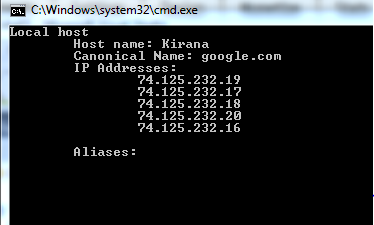
Resolving Hostname

I know, it is kind of lame. But I'll post it anyway.

using System;                   // for String and Console
using System.Collections.Generic;
using System.Linq;
using System.Text;
using System.Net;               // for Dns, IpHostEntry, IPAddress
using System.Net.Sockets;       // for SocketException

namespace SocketCoba01
{
    class Program
    {
        static void PrintHostInfo(string host)
        {
            try
            {
                IPHostEntry hostInfo;

                hostInfo = Dns.GetHostEntry(host);  //karena Dns.resolve sudah obsolete 
                //(baca dokumentasi .NET)

                //display the primary hostname
                Console.WriteLine("\tCanonical Name: " + hostInfo.HostName);

                //display list of IP adresses for this host
                Console.WriteLine("\tIP Addresses: ");
                foreach (IPAddress ip in hostInfo.AddressList)
                {
                    Console.WriteLine("\t\t{0}", ip.ToString());
                }

                Console.WriteLine();

                //display list of all aliases for this host
                Console.WriteLine("\tAliases: ");
                foreach (String alias in hostInfo.Aliases)
                {
                    Console.WriteLine("\t\t{0}", alias);
                }
            }
            catch (Exception) 
            {
                Console.WriteLine(".:. Unable to resolve host: " + host + "\n");
            }
 
        }
        static void Main(string[] args)
        {
            try
            {
                String LocalHostName = Dns.GetHostName();
                Console.WriteLine("Local host");
                Console.WriteLine("\tHost name: {0}",LocalHostName);

                PrintHostInfo(LocalHostName);                
            }
            catch (Exception) 
            {
                Console.WriteLine("error @Main");
            }
            Console.ReadKey();
        }

       
    }
}


Saturday, March 19, 2011

Copying Array's Content to Another

Several methods used to copy the contents of an array to another.

Random r = new Random();
int[] pins = new int[4]{ r.Next() % 10, r.Next() % 10,
                         r.Next() % 10, r.Next() % 10 };

// 1st method
int[] copy = new int[pins.Length];
for (int i = 0; i < pins.Length; i++ )
{
 copy[i] = pins[i];
}

// 2nd method
int[] copy2 = new int[pins.Length];
pins.CopyTo(copy2, 0); //starting from index 0 of copy2

// 3rd method
int[] copy3 = new int[pins.Length];
Array.Copy(pins,copy3,copy3.Length);

// 4th method
int[] copy4 = new int[pins.Length];
copy4 = (int[])pins.Clone();

All of them are copying the reference of the original array, not the value.

Friday, March 11, 2011

Step Through Codes during Debugging Process

  • Right-click at the starting line of the code which you want to analyze
  • Select "Run to cursor"
  • Your program will be run. Enter some values to test the code
  • In the lower-left side, choose 'Local' tab. Here, you can monitor the local variables assignment. 
  • Debug -> Step into (shortcut: F11), to run the next code
  • Do the last step for several time while monitoring the 'Local' tab, until you figure out how your code works.

Wednesday, March 9, 2011

Browse and Display Text File (C#)

using System;
using System.Collections.Generic;
using System.Linq;
using System.Text;
using System.Windows;
using System.Windows.Controls;
using System.Windows.Data;
using System.Windows.Documents;
using System.Windows.Input;
using System.Windows.Media;
using System.Windows.Media.Imaging;
using System.Windows.Navigation;
using System.Windows.Shapes;
using Microsoft.Win32;          //namespace buat OpenFileDialog 
using System.IO;

namespace BrowseAndDisplay
{
    /// 
    /// Interaction logic for MainWindow.xaml
    /// 
    public partial class MainWindow : Window
    {

        public MainWindow()
        {
            InitializeComponent();
        }

        private void buttonClose_Click(object sender, RoutedEventArgs e)
        {
            this.Close();
        }

        private void buttonBrowse_Click(object sender, RoutedEventArgs e)
        {
            //create an instance of the open file dialog box
            OpenFileDialog openFileDialog = new OpenFileDialog();

            openFileDialog.InitialDirectory = "C:";
            openFileDialog.Title = "Choose one of the text file";
            openFileDialog.FileName = "";
            openFileDialog.Filter = "Text file|*.txt";

            openFileDialog.ShowDialog();

            //isi textBox FileLocation dengan path file yang akan dibuka
            textBoxFileLocation.Text = openFileDialog.FileName;

            //tampilkan isi file text ke textBox DisplayTextFile
            FileInfo src = new FileInfo(openFileDialog.FileName);

            textBoxDisplayTextFile.Text = "";
            TextReader reader = src.OpenText();
            string line = reader.ReadLine();

            while (line != null)
            {
                textBoxDisplayTextFile.Text += line + '\n';
                line = reader.ReadLine();
            }
            reader.Close();
        }
    }
}


Saturday, September 11, 2010

Retrieve MP3 Metadata

I know, there are many modules can be used: eyeD3, mutagen, etc. But I think it is a good idea to understand first what is the concept of MP3 metadata.

Based on this Wikipedia article, the ID3v1 metadata container (which I used for this script) occupies 128 bytes beginning with the string TAG. The tag is placed at the end of the file to maintain compatibility with older media players.

ID3v1 consists of the following informations, including the bytes position:


for deeper information about ID3, including the extended tags, visit Wikipedia link above.

Just in case you haven't got this information yet, in Windows, you must read MP3 file as binary file, therefore you should use 'rb' for open function.

Here is my script:
import sys

filename = sys.argv[1]

fsock = open(filename, "rb", 0)
fsock.seek(-128,2) # get the last 128 bytes
tagdata = fsock.read(128)

fsock.close()

if tagdata[:3] == "TAG":
print "title\t: ", tagdata[3:33]
print "artist\t: ", tagdata[33:63]
print "album\t: ", tagdata[63:93]
print "year\t: ", tagdata[93:97]
print "comment\t: ", tagdata[97:126]
print "genre\t: ", tagdata[127:128]

Sunday, August 29, 2010

HTML Parsing using HTMLParser

Simple script to get the video download link from here, which are hosted at archive.org
This script is adapted from here.

HTMLParser usage
from Python documentation:

Usage:
    p = HTMLParser()
    p.feed(data)
    ...
    p.close()

Start tags are handled by calling handle_starttag() or
handle_startendtag(); end tags by handle_endtag().  The
data between tags is passed from the parser to the derived class
by calling handle_data() with the data as argument (the data
may be split up in arbitrary chunks).  Entity references are
passed by calling handle_entityref() with the entity
reference as the argument.  Numeric character references are
passed to handle_charref() with the string containing the
reference as the argument.

import sys
import urllib
import HTMLParser
import re

class GetLinks(HTMLParser.HTMLParser):
    def handle_starttag(self,tag,attrs):
        if tag == 'a':
            for name,value in attrs:
                if name == 'href':
                    if re.search('ArabicLanguageCourseVideos',value):
                        print(value)
                    
gl = GetLinks()
url = 'http://www.lqtoronto.com/videodl.html'

urlconn = urllib.urlopen(url)

# read and put the downloaded html code into url content
urlcontents = urlconn.read()

# input the downloaded material into HTMLParser's member function 
# for parsing
gl.feed(urlcontents)

Friday, August 27, 2010

Socket Exception Handlers

Based on book 'Foundations of Python Network Programming' chapter 2.

Based on Python documentation, there are four socket exceptions (error, herror, gaierror, timeout). Here, I only use the socket.error only. It is used for general I/O and communication problems.

For an illustration, try the following from command line:
> python.exe socket.py google.com 80 index.html

import socket,sys

# standard input
host = sys.argv[1]
port = sys.argv[2]
filename = sys.argv[3]

# error handler 
def errorHandler(message,e):
    print('{0} {1}' .format(message,e))
    sys.exit(1)
    
# create socket 
try:
    s = socket.socket(socket.AF_INET,socket.SOCK_STREAM)
except socket.error, e:
    errorHandler('Socket creation error: ',e)

# input port manipulation
try:
    port = int(port)
except ValueError,e:
    errorHandler('Error port number: ',e)

# connection initiation
try:
    s.connect((host,port))
except socket.error, e:
    errorHandler('error socket initiation: ',e)
    
# sending HTTP request
try:
    s.sendall("GET %s HTTP/1.0\r\n\r\n" % filename)
except socket.error, e:
    errorHandler('Error sending HTTP request: ',e)
    
# receiving data from server
while 1:
    try:
        buf = s.recv(2048)
    except socket.error, e:
        errorHandler('Error receiving data: ',e)
    if not len(buf):
        break
    sys.stdout.write(buf)

Monday, August 23, 2010

Install zope.interface for Twisted

Twisted uses Zope Interface to define and document APIs.
  1. Download it from here. It's in egg format. Choose the appropriate Python version with ours.
  2. To install .egg, we need 'Easy Install' that is part of setuptools. So, we have to install setuptools first. Download it from here. Choose the appropriate Python version with ours. Because our aim is to be able to install .egg, choose setuptools in .exe format.
  3. Run the installer. 
  4. It will install a new executable file called 'easy_install.exe' under Python's 'Scripts' folder.
  5. To install the zope.interface in .egg format, I did the following in Command Line:
c:\Python26\Scripts\easy_install.exe c:\zope.interface-3.6.1-py2.6-win32.egg
Now we can use the zope.interface for our twisted.

---
Further readings:

Thursday, August 19, 2010

SyntaxHighlighter

SyntaxHighlighter is a fully functional self-contained code syntax highlighter developed in JavaScript. In short, it beautifies your code posts, something like this for Python codes:
class SimpleDescriptor(object):

    def __get__(self, instance, owner):
        # Check if the value has been set
        if (not hasattr(self, "_value")):
            raise AttributeError
        print "Getting value: %s" % self._value
        return self._value

    def __set__(self, instance, value):
        print "Setting to %s" % value
        self._value = value

    def __delete__(self, instance):
        del(self._value)
This article provides very-easy steps to utilize SyntaxHighlighter.
-

Checking Input Type

The idea:
check whether input is numeric or not. First, try to convert the input into float object. If failed, then it is not numeric for sure :p
while True:
    try:
        radius = float(input('masukkan jari-jari lingkaran: '))
        break
    except ValueError:
        print('masukkan angka!')
-